
Yandex Maps and Navigator
Direct Cursus Computer Systems Trading LLCMaps & Navigation
4.01.59K Reviews
- Version
- 30.4.1
- Installs
- 100.00M
- Age Rating
- Everyone
Screenshots
Our Review of Yandex Maps and Navigator
 Analysis by Appyee
I judge a navigation app less by its first impressive route than by whether I still reach for it after the novelty wears off. Yandex Maps and Navigator makes a strong first impression by bringing directions, traffic and place searches together, but its real value depends on the journeys you repeat and how well its local information fits your area. I’d treat it as a practical option to test against the routes and places I actually use, rather than assuming one map app is best everywhere.
Why the first week feels useful
On early trips, the appeal is straightforward: search for a destination, compare possible routes, and follow directions without switching between separate tools. That combination is especially helpful when I’m going somewhere unfamiliar and need both the route and a nearby place to stop. Searching for a pharmacy, café or grocery shop along the way can turn a navigation session into a quick bit of trip planning.
The app is a free maps and navigation app from Direct Cursus Computer Systems Trading LLC. It is rated for Everyone, and its current version is 29.3.2, with Android support starting at version 8.0. Its scale is notable too: it has over 100 million installs and an average rating of 4.0 from around 1.8 million ratings. Those figures tell me it has a broad audience, though they can’t guarantee that its directions or business listings will be equally strong on every street I travel.
Everyday routes are the real test
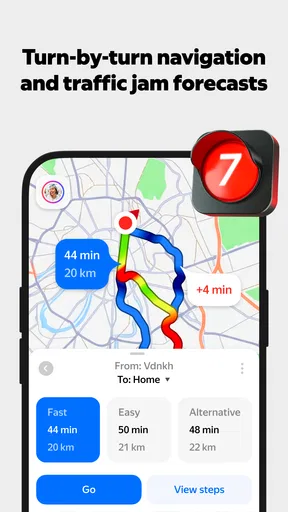
Traffic guidance is most useful when I already know a journey well enough to spot a meaningful change. If my usual drive suddenly looks slower, I can weigh a suggested alternative against what I know about the roads instead of following the first option automatically. A reroute may save time, but a shorter estimate is not always worth an unfamiliar turn or a more complicated arrival. I like having the information; I still make the final call.
For a realistic weekday example, imagine leaving work to collect groceries before heading home. I can look up the shop, check where it sits relative to my route, and use navigation for the remaining drive. That is a more useful test than tapping around the map for a few minutes: it shows whether the search result is the right branch, whether the route makes sense at that hour, and whether the directions are easy to follow when I’m focused on driving. I’d enter the destination before setting off and keep my attention on the road, not the screen.
Finding places takes more than a search
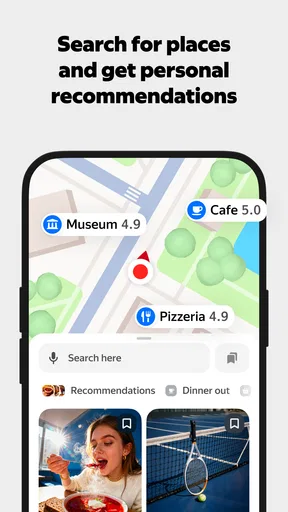
Local search can save time in a new neighborhood, but I wouldn’t choose a business on a name alone. When user reviews and ratings are available, I use them as a quick check, then compare the result’s location and details with what I need. A café that sounds right but sits on the wrong side of a busy route may not be convenient at all. For anything time-sensitive, I’d verify the destination before leaving rather than treating a map result as a guarantee that a place is open or suitable.
A useful habit is to search with a specific need and then inspect the result before starting navigation. That small pause helps avoid a common frustration: reaching a similarly named place when I meant a particular branch. It also makes place search work better for errands, where proximity and a sensible route matter as much as the business category.
Offline use needs a little planning
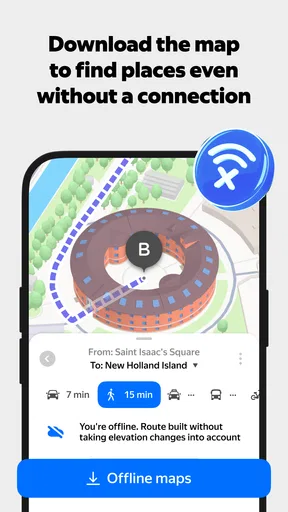
Offline maps are valuable when I expect unreliable data, but they reward preparation. I’d download the relevant area while I still have a connection and check that I chose the region I’ll actually travel through. This is especially handy before a road trip or a walk in a place where signal may be patchy. It reduces dependence on a live connection for the map itself; it shouldn’t be mistaken for a promise that every online detail or live traffic update will be available offline.
That distinction matters when deciding what to rely on. If I need current traffic, I plan to use the app while connected. If I mainly need to see roads and keep my bearings, a saved map can be a sensible backup. I’d still think through the route before setting out, since offline access is most reassuring when I already know the destination and have prepared the map in advance.
Does it earn a place in my routine?
Saved routes and home or work addresses can make regular trips easier to start, while route weather information may help me think ahead. These touches are most useful when they remove repeated setup, not because I expect the app to make every decision for me. I’d save only destinations I genuinely use and review the suggested route when circumstances change, rather than assuming a familiar commute will always be identical.
Habit is where this app has to prove itself. If I use it for the same commute, a weekly errand and occasional trips to unfamiliar places, I can judge whether the search results and route choices keep earning my attention. If I only open it once in a while, saved places and familiar settings matter less. And although the app may adapt to usage, I would still check its directions rather than treating any navigation tool as infallible.
Where it may feel tiring
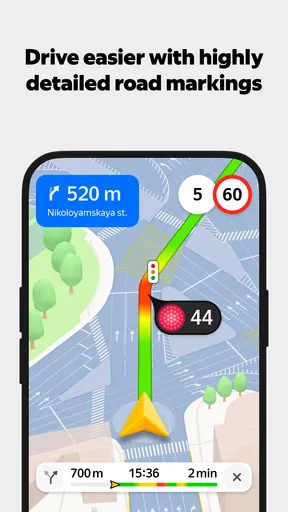
Navigation can become distracting when a route changes repeatedly or when I’m trying to read a map while moving. Voice guidance helps me keep my eyes on the road, but it does not replace paying attention to signs, traffic and the actual street layout. Before a complicated drive, I’d review the route while parked and set the destination before moving. If the screen becomes a source of stress, using simpler guidance or stopping safely to reassess is better than trying to manage the app in motion.
There is also a practical trade-off between relying on a familiar alternative and trying a different map. People who already know another navigation app’s interface may not gain much by switching for every routine journey. I’d compare them on the same few trips: a familiar commute, a destination in an unfamiliar district, and a search for a local business. The best choice is the one whose route and place information works for those specific needs, not the one with the most features on paper.
Getting Started with Yandex Maps and Navigator
So, you’ve decided to give Yandex Maps and Navigator a try. Good choice! The first thing you’ll notice is how easy it is to set up. Just download the app from your app store—whether you’re on Android or iOS, Yandex has got you covered. Once installed, you’ll be greeted by a sleek, user-friendly interface. It’s like having a high-tech map right in your pocket, and let’s be honest, we can all use a little help navigating our daily commutes.
Exploring the Features
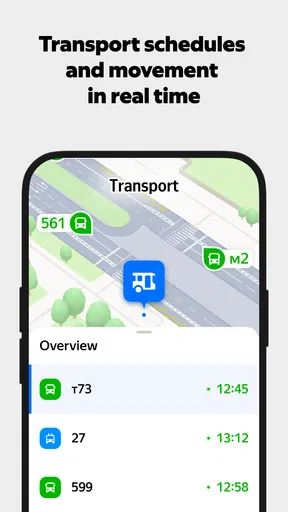
Now, let’s talk features. This app isn’t just about getting from point A to B; it’s about doing it efficiently and stress-free. One standout feature is its real-time traffic updates. No one likes sitting in a jam, and Yandex does a great job of helping you avoid those pesky traffic snarls. The app collects data from users and other sources to provide you with the fastest routes available. So, if there’s a sudden traffic jam or road closure, you’ll be the first to know and can reroute accordingly.
Another cool feature is the voice navigation. Imagine having a calm, soothing voice guiding you through every turn and twist of your journey. It’s like having a co-pilot who never gets tired or distracted. And for those of us who are a bit directionally challenged, this is a lifesaver.
Local Business and Points of Interest
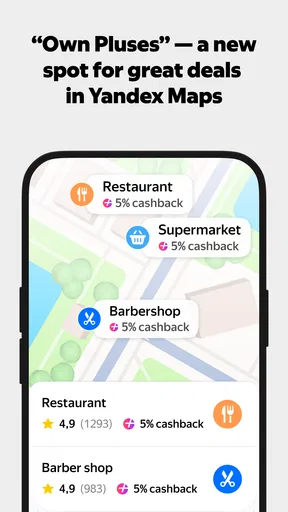
Ever been in a new area and wondered where the best coffee shop is? Yandex Maps has got you covered with its extensive database of local businesses and points of interest. Just type in what you’re looking for, and you’ll have a list of options faster than you can say "espresso." Plus, you can check out user reviews and ratings to ensure you’re making the best choice. It’s like having a local guide at your fingertips.
Offline Maps: A Traveler’s Best Friend
One of the most impressive features is the offline maps. We’ve all been there—traveling abroad or in a remote area with spotty internet. Yandex lets you download maps for offline use, which means you’re never truly lost, even without a data connection. Just download the map of the area you’re going to explore, and you’re all set. It’s super handy and can save you from a lot of headaches.
Personalization and User Experience
Yandex Maps and Navigator also offer a personalized experience. You can save your favorite routes, set home and work addresses, and even check the weather along your route. It’s these little touches that make the app feel tailored to your needs. The app also learns from your habits, which means it gets better and more accurate the more you use it.
And let’s not forget about the clean, intuitive design. The app is visually appealing without being cluttered. You get all the information you need without feeling overwhelmed, which is a huge plus in my book.
Living with the app month to month
After the first week, I’d stop judging it by novelty and pay attention to how often it solves a real problem. Does it make the routine drive easier to begin? Can I find a useful stop without interrupting the trip? Do saved locations save enough repeated effort to matter? Those are the small tests that determine whether it becomes part of my routine or just another app I open when I’m lost.
Maintenance is fairly simple in concept: keep the app available, save maps for areas where connectivity may be unreliable, and refresh those downloads when planning changes. Offline preparation is the part most likely to be forgotten, so I’d make it part of trip planning rather than wait until the signal has already dropped. On a regular city commute, that extra step may be unnecessary; before heading somewhere remote or unfamiliar, it can be worthwhile.
Would I use it as my only map? That depends on where I travel. I’d try it as the main navigator if its local search and routing are dependable on my regular roads. If a particular neighborhood has incomplete place details, or another mapping app gives clearer information for a destination I use often, I’d keep that alternative available. Comparing a few real trips is more revealing than switching everything over after one successful drive.
Who should try it—and who may prefer another tool
I think it is a good fit for someone who wants directions, traffic context, local-place discovery and offline maps in one app, especially if they travel through areas where its map coverage works well. It also makes sense for a driver who likes to check a route before leaving, then rely on voice directions rather than continually glance at the display. Travelers who plan ahead can get particular value from downloading a map before a connection becomes unreliable.
I’d be more cautious if I depend on very specific business details, need to navigate somewhere with poor coverage in the app, or already have a navigation tool that consistently handles my routes better. The practical question is not whether Yandex Maps has useful features; it does. It is whether those features are accurate and convenient in the places I actually go. If local results don’t match what I see on the ground, I would verify important stops elsewhere rather than assume the map is always current.
Compared with the usual alternatives, the meaningful difference is often less about the basic act of drawing a route and more about the combination of traffic, place search and offline preparation. I would not expect every service to show identical routes or business details. For a fair comparison, I’d check the same destination at the same time and inspect the arrival point, not just the estimated journey. For a one-off trip, whichever app gives me clearer instructions wins; for daily use, consistency matters more than a single clever reroute.
Final Thoughts
So, is Yandex Maps and Navigator worth the download? Absolutely! With its comprehensive features, real-time updates, and intuitive design, it’s a fantastic tool for anyone looking to make their travels more efficient and enjoyable. Whether you’re commuting to work or exploring new destinations, this app is like having a trusted friend along for the ride.
In a world where time is of the essence, having a reliable navigation app can make all the difference. So why not give Yandex Maps and Navigator a try and see how it transforms your travel experience? Happy navigating!
My long-term verdict is positive, with a sensible condition: I’d keep it if it continues to be useful on my own routes, not simply because it offers a broad set of tools. The free price makes trying it an easy decision, while a little preparation makes its offline maps more dependable as a backup. I would still verify unfamiliar business stops and stay alert to road signs, but for a person whose local coverage suits their routine, it can earn a lasting place through repeated, ordinary journeys.
Verdict
Strengths of Yandex Maps and Navigator
- Offers offline maps for seamless navigation.
- Real-time traffic updates enhance route planning.
- Detailed public transport information available.
- User-friendly interface with intuitive controls.
- Customizable map layers for personalized views.
Limitations of Yandex Maps and Navigator
- Limited coverage in some rural areas.
- Occasional inaccuracies in traffic data.
- Consistent internet needed for live updates.
- Some features require in-app purchases.
- Ads can be intrusive during use.
Other Releases by Direct Cursus Computer Systems Trading LLC
View All
Yandex Browser with Alice AI
Personalization4.3

Дом с Алисой
House & Home4.0

Yandex.Realty
House & Home4.5

Яндекс Афиша — билеты
Events4.7
Similar Picks in This Category
View All
Uber - Request a ride
Uber Technologies, Inc.4.7


inDrive. Rides with fair fares
® SUOL INNOVATIONS LTD4.8

Yandex Go: Taxi Food Delivery
Mikromobilnost LLC Belgrade4.8

Bolt: Request a Ride
Bolt Technology4.8

Rapido: Bike-Taxi, Auto & Cabs
Rapido Bike Taxi4.8
You May Also Like
View All
Frequently Asked Questions
What features does Yandex Maps and Navigator offer?
Yandex Maps and Navigator provides comprehensive features such as real-time traffic updates, detailed maps with 3D views, offline map access, public transport routes, and voice-guided navigation. Additionally, the app offers points of interest, user reviews, and integrated search for locations, making it a robust tool for navigating both urban and rural areas.
Can I use Yandex Maps and Navigator offline?
Yes, Yandex Maps and Navigator allows users to download maps for offline use. This feature is particularly useful in areas with poor internet connectivity or when traveling abroad. Users can download maps for entire regions or specific areas, ensuring that navigation remains uninterrupted without the need for a data connection.
How accurate is the real-time traffic information?
Yandex Maps and Navigator provides highly accurate real-time traffic information by utilizing data from multiple sources, including user feedback and historical traffic patterns. This allows the app to offer reliable estimates for travel times and suggest alternative routes to avoid congestion, helping users reach their destinations more efficiently.
Is Yandex Maps and Navigator available globally?
While Yandex Maps and Navigator is primarily focused on Russia and neighboring countries, it does offer global coverage. However, the level of detail and features available may vary by region. It's advisable to check the app's coverage and features for your specific area before relying on it for navigation.
Does Yandex Maps and Navigator support multiple languages?
Yes, Yandex Maps and Navigator supports multiple languages, making it accessible to a broad audience. The app offers language options for the interface and voice navigation, allowing users to select their preferred language for a more personalized and convenient experience. Check the app settings to see the full list of supported languages.
